



Killing Point
Auto-detects drop-off zones.
Cross-analysis with clicks pinpoints the cause.
Cross-analysis with clicks pinpoints the cause.
 Back
Back
On-Screen AI reads the screen directly. It understands context — not just numbers — and clearly explains the why behind user behavior.
Built for data-driven marketers and PMs.
Stop guessing. Start knowing.


Time spent creating reports
2-3hrs

Monthly UX consulting cost
$3.5K+

Required to interpret data
Expert

Scroll is the cause, click is the result.
No scroll, no click. Reached it but still didn't click? Analyze scroll and click together to find the real drop-off cause.


 PVs, bounce rate, duration
 No scroll data
Can't tell "how far they scrolled"
Unknown if CTA was even seen
You know clicks, but not why they didn't.
No scroll data
Can't tell "how far they scrolled"
Unknown if CTA was even seen
You know clicks, but not why they didn't.
 Section reach & attention
Killing Point + Click Behavior Cross-Analysis
Hidden Gem Zones + Conversion Validation
Auto-classification: Reach → Notice → Interest → Action
Actionable recommendations
Section reach & attention
Killing Point + Click Behavior Cross-Analysis
Hidden Gem Zones + Conversion Validation
Auto-classification: Reach → Notice → Interest → Action
Actionable recommendations
From Complex Data to Clear Insights
Stop guessing from colors.
On-Screen AI automatically analyzes your heatmaps
and generates actionable reports.
Interpret colors by feeling
Manual JSON parsing
No insights without experts
2-3 hours per report
Auto-identifies problems
Actionable suggestions
Consultant-level insights
Generated in 30 seconds

Get Insights in
3 Simple Steps
No complex setup. On-Screen AI automatically analyzes and
generates your report.
Installed
Collecting
 AI ready
Beusable's
Proprietary Technology
Other AI only analyzes numbers.
Beusable's On-Screen AI sees your actual screen.

Simultaneous screenshot + data analysis
Understands content context (images, text, layout)
Hallucination-prevention design
Analysis complete in 30 seconds

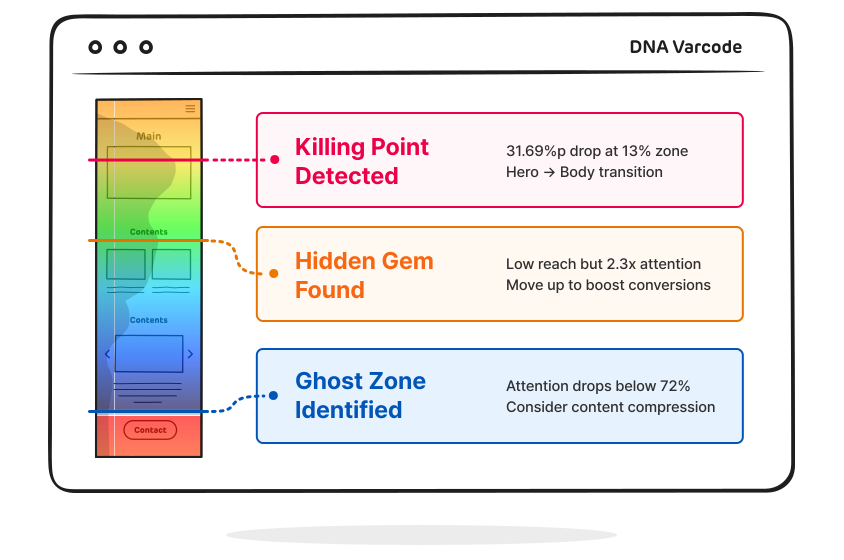
Killing Point — Drop-off spike
High attention zone
Hidden Gem — Hidden opportunity
Ghost Zone — Weak spot
Key Insights
AI Discovers for You
Cutting through complex data to surface what truly matters.


Automatic Visitor Segmentation


What Our Customers Say
Hear from teams who've already experienced
On-Screen AI Reports.



What Can You Do with
On-Screen AI Reports?
Get concrete answers to
real business questions.
 E-commerce
Check reach to the buy button, review attention, and drop-off points — analyze what drove clicks to improve content layout.
E-commerce
Check reach to the buy button, review attention, and drop-off points — analyze what drove clicks to improve content layout.
 Content · Media
Measure read-through rate, find drop-off paragraphs, and track clicked links to improve content structure.
Content · Media
Measure read-through rate, find drop-off paragraphs, and track clicked links to improve content structure.
 SAAS · B2B
Compare pricing reach and CTA click rate — find blockers and optimize page length and section order.
SAAS · B2B
Compare pricing reach and CTA click rate — find blockers and optimize page length and section order.
 Marketing · Landing Pages
Measure CTA reach and click conversion together — cut content or reorder to boost conversion.
Marketing · Landing Pages
Measure CTA reach and click conversion together — cut content or reorder to boost conversion.
See a Real AI Report
An actual report analyzed by On-Screen AI and visualized with Varcode.
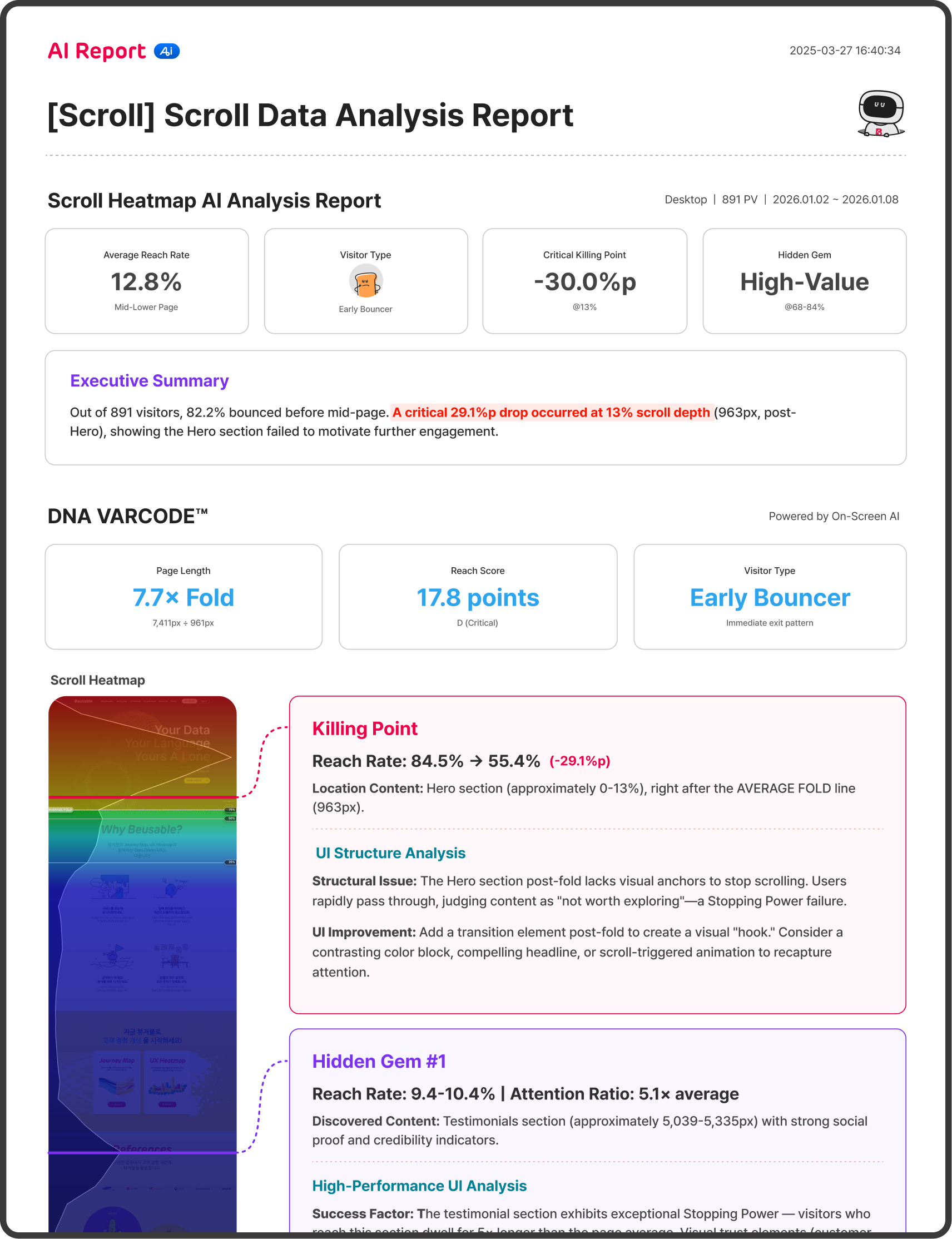 View AI Report
Opens in a new tab
Get Your AI Report for 30JAM
Generate one report at 1/150 the cost of consulting.
 30JAM
30JAM

Your data is already waiting to become actionable insights.
Pay only for what you use · Works with any plan · Pricing may vary

On-Screen AI is Beusable's proprietary technology. Unlike standard AI that only analyzes numeric data, On-Screen AI analyzes data while viewing actual screenshots. This enables contextual analysis—understanding "what content is in this section" and "why users left here."
Varcode (Visual + Barcode) is Beusable's unique visualization method that shows your page's UX health at a glance. Just as DNA carries genetic information, Varcode carries your page's UX information—reach rates, attention levels, and problem areas—all in one view.
JAM is the credit used to access Beusable's AI features. You can use Jam to get AI reports regardless of your subscription plan. Jam credits can be purchased and used within the Beusable service.
A Scroll Heatmap AI Report costs 30 Jam (approximately $25). That's about 1/150th the cost of monthly UX consulting ($3,500+) for consultant-level insights. Jam costs may vary based on promotions and service conditions.